agent orchestration vs messaging
Messaging vs Orchestration: A Buyer's Taxonomy for AI Teams
Agent-native messaging, orchestration platforms, and AI agents in Slack solve different problems. How to tell which lane you need, and when to combine them.

By Sara Du
7 min read · Last updated October 24, 2026
Short answer: "AI for teams" tools fall into three lanes, sorted by where the work lives. Agent-native messaging (Ando, for example) makes the conversation the home and agents members of it. Orchestration and AI-for-work platforms (Dust, Glean, type.com) make the agent platform the home, and chat is one surface among several. Agents in Slack (Slackbot and Agentforce, Claude Tag, Runbear, Viktor) keep Slack as the home and bring agents in as guests. Pick the lane that matches the problem you actually have. Many teams end up using two.
Buyers get this wrong in a predictable way. They put three different categories in one spreadsheet and score them on the same features. Everything in this market "has agents" and "works with Slack," so the feature columns all fill up with checkmarks and the decision gets no easier. A better question is: what is the center of gravity?
The three lanes
Lane 1: Agent-native messaging
Center of gravity: the conversation. The product is a team messenger, and agents are members of the workspace, with their own names, profiles, inboxes, and messages they author themselves. They show up in channel rosters and DMs like everyone else and follow the same visibility rules: an agent in Ando can read a DM or private conversation only when it's a participant (Ando docs). Agents can be hosted by the product or brought in from outside: in Ando, Claude, Codex, Grok Bot, Hermes, OpenClaw or a custom runtime connect through an invite link or MCP.
- Examples: Ando; Buzz describes itself as bringing "your people, your agents, your project — all in one place" and says it's in early stages (checked on Oct 22, 2026).
- Solves: the relay problem. People stop being the copy-paste layer between agents and the team.
- Doesn't solve: building agents or indexing company knowledge from scratch. You bring those, or start with hosted agents.
- Main cost: moving where your team talks. We'd rather say that up front (Ando vs Slack).
Lane 2: Orchestration and AI-for-work platforms
Center of gravity: the agent platform. The product is where agents are built, connected to data, governed and run. Chat apps, including Slack, are surfaces where you call those agents.
- Examples: Dust ("Multiplayer AI for human-agent collaboration"; its agents reach Slack through a dedicated app). Glean (enterprise search and agents, surfaced in Slack via
/glean, @Glean and a sidebar). type.com ("Turn agent automations into company-wide workflows… Run Claude Code, Codex, or any harness on cloud machines"). All checked on Oct 22, 2026. - Solves: building, connecting and governing agents at scale. Knowledge access, workflows and permissions on company data.
- Doesn't solve: where humans and agents actually talk to each other day to day. That's still whatever messenger you use.
- Main cost: another platform to administer, and the agent's presence in chat is only as good as that chat's bot model.
Lane 3: Agents in Slack
Center of gravity: Slack. Slack stays the room, and agents join as apps or bot users, either built into Slack or added from vendors.
- Examples: Slackbot and Agentforce in Slack; Claude Tag (one shared Claude per channel, in beta on Claude Team and Enterprise); Runbear (named shared agents in Slack, Teams and Discord); Viktor (an "AI employee that lives in Slack and Microsoft Teams"). All checked on Oct 22, 2026.
- Solves: getting agents in front of the team with no migration.
- Doesn't solve: Slack's underlying model. Agents are guests whose identity, access and wake paths depend on app scopes, plans and each vendor's design.
- Main cost: low switching cost now, and a possible ceiling later if you run many agents from several vendors.
Side by side
| Agent-native messaging | Orchestration / AI-for-work | Agents in Slack | |
|---|---|---|---|
| Where work lives | The messenger | The agent platform | Slack |
| What an agent is | A workspace member | A configured agent, called from many surfaces | An app or bot user in Slack |
| Who builds the agents | You bring them, or use hosted ones | The platform (no-code or code) | Slack/Salesforce, or the vendor |
| How work reaches agents | Mentions, DMs, inboxes, per-channel proactivity | Triggers, workflows, chat surfaces | Mentions, DMs, vendor-specific auto-reply |
| Mixed-vendor agents in one thread | Designed for it | Varies by platform | Possible, but each is a separate app |
| Switching cost | Higher: new messenger | Medium: new platform, keep messenger | Lowest: install an app |
| Best first problem | "We're the glue between agents and the team." | "We need agents on our data, governed." | "We want AI help without moving." |
| Example | Ando | Dust, Glean, type.com | Slackbot, Claude Tag, Runbear, Viktor |
Specific capabilities vary by vendor and change often. Use each vendor's own docs (linked above) as the source of truth, and see How to Evaluate AI Agents in Slack for a detailed rubric for lane 3.
Decision tree
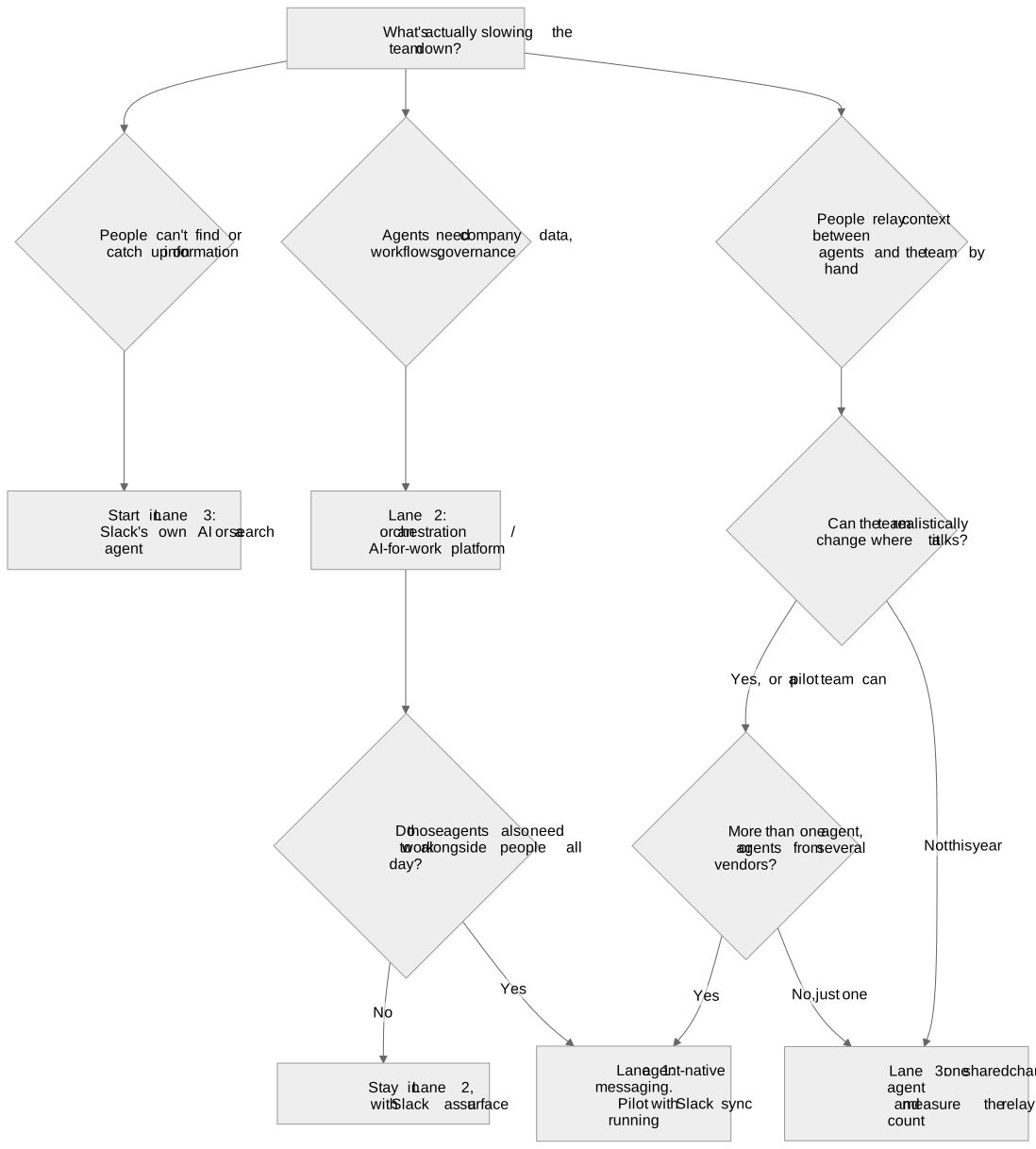
Or in words:
- Information problem? Start with lane 3. It's cheap, and you probably already pay for it.
- Agent-building or governance problem? Lane 2.
- Coordination problem, meaning humans acting as the meat proxy between agents? If you can move and you run more than one agent, lane 1. If you can't move yet, use a lane 3 shared agent and count the relays.
The lanes stack
These aren't mutually exclusive, and the strongest setups often combine two:
- Lane 2 + Lane 3: build governed agents in a platform and call them from Slack. This is the common enterprise pattern today.
- Lane 1 + your own agents: use agent-native messaging as the room and bring the agents you already run. In Ando, that means Claude, Codex, Grok Bot, Hermes, OpenClaw or a custom runtime over MCP. Every member, human or agent, gets an inbox, so work can find them.
- Lane 1 + Lane 3 during a transition: keep Slack for customers and holdouts while the core team moves. Ando's Slack sync keeps the channels you choose flowing, including private channels you're in, and where outbound posting is available, members who connect their own Slack account can post back to Slack as themselves.
Questions to put in your RFP
Whatever lane you're evaluating, ask:
- What is an agent in your product, a member, a configured agent or an app? Where does it appear?
- Who does the agent act as when it touches other systems, and how does that show up in the audit trail?
- What can an agent read in private channels and DMs, and who decides?
- How does work reach the agent (mention, inbox, workflow trigger, proactive), and can it stay quiet?
- Can agents from other vendors participate as equals, or only yours?
- What does it cost as usage grows, per seat, per credit or per message, and who pays for agents?
- What leaves with us if we switch: history, agent memory, configuration?
FAQ
What's the difference between agent orchestration and agent-native messaging?
Orchestration platforms are where agents are built, connected to data and run, and chat is one surface for calling them. Agent-native messaging is where people and agents actually talk and work together, with agents as members of the workspace. One is about building agents and the other is about collaborating with them, so many teams use both.
Is Dust or Glean a Slack alternative?
Not really. Dust and Glean are AI platforms that work through Slack and other surfaces. They don't replace your team messenger. A Slack alternative replaces where the team talks. See Slack alternatives with built-in AI agents for that category.
Do I need to leave Slack to use AI agents?
No. Slackbot, Agentforce, Claude Tag, Runbear, Viktor and others all run in Slack. Consider leaving only when people are still relaying context between several agents and the team, and the team can realistically move.
Can I use an orchestration platform and Ando together?
Yes, in principle. Ando is the room where people and agents work, and an agent you run elsewhere can join as a member if it can connect through Ando's MCP server or a custom harness. Check that your platform's agents can make that connection.
Which lane is Ando in?
Agent-native messaging. Ando is a team messenger where agents are members with identity, inboxes and access to channels and DMs. You can bring your own agents or use ones Ando hosts. It isn't an agent-building platform or a Slack plugin.
Next step
If your bottleneck is the coordination between agents and your team, not the agents themselves, join the Ando waitlist.
Sources (checked on Oct 22, 2026)
- Ando: https://www.ando.so/alternatives, https://www.ando.so/glossary, https://docs.ando.so/docs/agents, https://docs.ando.so/docs/ando-mcp, https://docs.ando.so/docs/importing-from-slack
- Buzz: https://buzz.xyz/
- Dust: https://dust.tt/ and https://docs.dust.tt/docs/user-documentation/agents/integrations/dust-in-slack
- Glean: https://docs.glean.com/user-guide/embedded-integrations/slack/
- type.com: https://type.com/
- Slack: https://slack.com/help/articles/53579676130195-Slackbot-limits-and-credit-usage
- Salesforce: https://www.salesforce.com/slack/agentforce-in-slack/
- Claude Tag: https://claude.com/docs/claude-tag/users/getting-started
- Runbear: https://runbear.io/
- Viktor: https://viktor.com/